Black Friday Poster Maker
Turn one product photo, one offer and a promo code into a sale poster that is ready to print or post — US Letter and A4 at 300 ppi, plus Instagram, Story and Pinterest sizes. No designer, no template to fight.
Built for small shops running their own sale. Start free, no design skills needed.
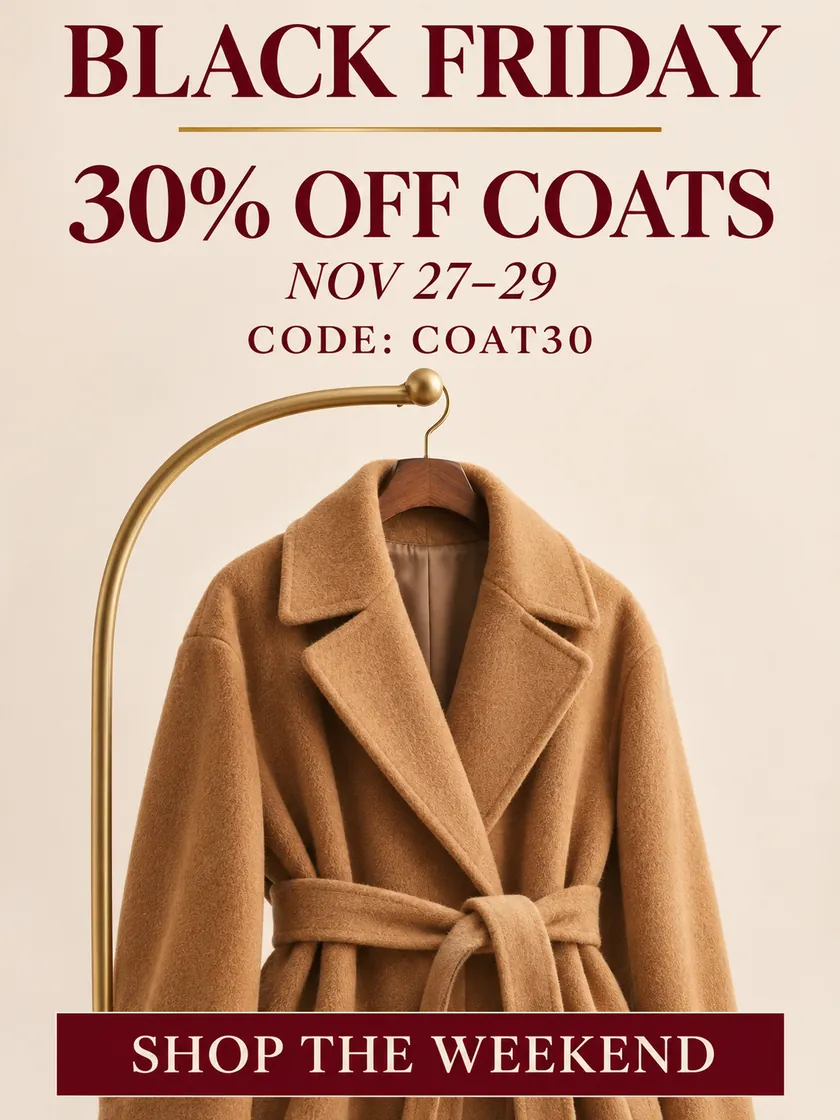
Create a Black Friday sale poster for a small clothing boutique. Feature a camel coat, using the attached product photo if supplied. Keep the coat’s cut, color and details recognizable. Use a warm cream, camel and deep burgundy palette with spacious typography. Print these exact lines: "BLACK FRIDAY", "30% OFF COATS", "NOV 27–29", "CODE COAT30", "SHOP THE WEEKEND". Make the discount easy to read at a glance. Do not add other offers or logos.
Creative AI illustrations, not verified model outputs.
What a Black Friday poster maker actually does
A template library hands you someone else's layout and asks you to swap the words. Every shop on the street ends up with the same black-and-red design, and shoppers stop reading any of them. A poster maker that works from a brief does the opposite: you name the product, the percentage, the dates and the mood, and the layout, palette and hierarchy are generated for your sale.
That matters most in the last two weeks of November, when a small shop has stock to move and no designer on call. The poster has to be print-ready today and good enough to post tonight.
What PaevonAI gets right on a Black Friday poster
Discounts and promo codes that survive generation
Most AI images smear a promo code into a row of letters. PaevonAI renders the text lines you type — headline, percentage, dates, code — so you check the poster instead of retouching it. Read every line against your brief before you send it to print.
Your product photo, not a stock stand-in
Upload your product shot and the poster is composed around it. For a Black Friday sale poster that is the difference between a design that sells your coat and a design that sells a coat.
Print and social sizes from the same brief
Start with US Letter or A4 at 300 ppi for the window or the counter, then rebuild the same brief for 1080×1350, square and Story. Shop and feed stay recognisably the same campaign.
Black Friday urgency without the template look
Black and red is the default, not a rule. Ask for burgundy and gold, cream and camel, or electric blue on near-black — the sale still reads as urgent, but it looks like your shop.
Poster, flyer or social post: which one do you need?
| Format | Job it does | Where it goes | What must be on it |
|---|---|---|---|
| Black Friday poster | One offer, seen at a glance | Window, wall, counter, feed | Product, discount, dates, CTA |
| Black Friday flyer | Explains a promotion in detail | Handouts, bags, counters | Rules, address, QR code, contact |
| Social post / Story | Stops the scroll | Instagram, Facebook, Pinterest | One number, one product, one line |
A poster carries one offer; a flyer explains it. If you need both, build the poster first and hand the same brief to the flyer maker.
Black Friday poster sizes for print and social
| Where it goes | Preset | Pixels | Note |
|---|---|---|---|
| Shop window, counter, handout | US Letter 8.5×11 in | 2550×3300 | 300 ppi print, default |
| Print outside the US | A4 | 2480×3508 | 300 ppi print |
| Instagram / Facebook feed | Portrait 4:5 | 1080×1350 | Tallest feed format |
| Feed and marketplace listing | Square 1:1 | 1080×1080 | Accepted everywhere |
| Stories and Reels | Story 9:16 | 1080×1920 | Keep text 250 px clear of top and bottom |
| Pin 2:3 | 1000×1500 | Standard pin ratio |
Generate the print size first, then rebuild the brief on each social canvas instead of cropping the poster.
How to make a Black Friday poster in three steps
Step 1 — Write the brief.
Name the product, the offer, the dates, the promo code and the mood.
Step 2 — Pick the size.
US Letter or A4 for print, 1080×1350 or Story for social.
Step 3 — Check the text, then rebuild.
Read every line against your brief, regenerate if a digit slipped, then run the same brief on the social size.
Write a brief that gives you a usable poster the first time
- Lead with one offer. "Up to 50% off sneakers" beats "deals on everything". A banner that promises four things delivers none.
- Type every line you want printed. Headline, percentage, dates, code — in capitals, exactly as they should appear.
- Choose the palette on purpose. Say "matte black with an orange accent" or the poster defaults to black and red.
- Urgency, not clutter. A date line and "limited stock" create urgency; five badges and three fonts create noise.
Who makes Black Friday posters with PaevonAI
- The boutique with a weekend to move stock — describe the coat and the discount, print the poster the same afternoon.
- One online store, four channels — one headline for the homepage, the feed, a Story and a pin.
- The café with a Friday-only bean deal — offer, hours and a free-drink hook on a Letter sheet for the glass door.
- The creator shop with a code people have to type — the code is a rendered text line, not an implied one.
- The electronics shop opening at 6 a.m. — one hero product, the dollar saving, the opening time, "limited stock".
- The store that needs Monday too — swap the headline, dates and palette and the same brief becomes a Cyber Monday poster.
Black Friday poster examples and formats
Browse generated examples by shop type — apparel, beauty, coffee, electronics, home goods — and start from the one closest to your offer. Each example loads its brief, so you can keep the layout idea and change the product, discount and code to your own.
Looking for a template you edit by hand instead? PaevonAI starts from a brief rather than a fixed template, so the result is your layout, not a swapped one.
After Friday: Cyber Monday and weekend sale posters
The Friday poster worked, so Monday needs its own. Change the headline, dates and palette in the brief and PaevonAI returns a matching Cyber Monday poster. Small Business Saturday and Christmas sale posters work the same way.
Black Friday poster maker FAQ
You can start free; generations use credits, so check your balance before a long batch.
A poster is displayed and carries one offer; a flyer is handed out and holds the detail.
Yes, if you type it as a text line in the brief. Always read the finished poster against your brief.
Yes, attach your own shots and the poster is built around them.
US Letter (2550×3300) or A4 (2480×3508), both 300 ppi.
No. Name a palette and the urgency stays while the brand does too.
Yes, on your shop, store, ads and social accounts, with images you have rights to.
Yes, same brief, new headline and dates.
More tools for your Black Friday campaign
Use the AI image generator for posters, flyers, banners and social posts.